Standalone Activity
Standalone Activities are available as a Pre-release feature in Temporal Cloud and in a special release of the Temporal CLI.
See limitations below.
What is a Standalone Activity?
If you need to orchestrate multiple Activities, use a Workflow. But if you just need to execute a single Activity, use a Standalone Activity.
Standalone Activities are Temporal’s job queue - the simplest way to run durable, retryable tasks on Temporal.
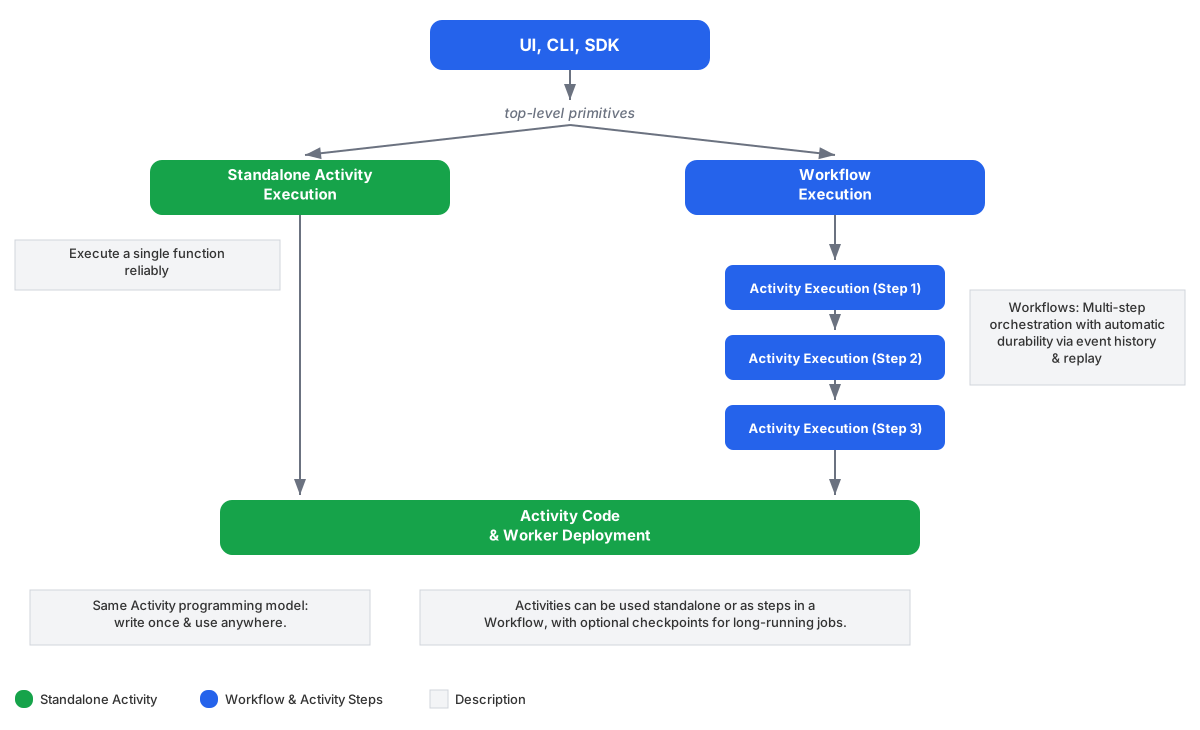
A Standalone Activity is a top-level Activity Execution started directly by a Client, without using a Workflow. This results in fewer Billable Actions in Temporal Cloud than using a Workflow to run a single Activity. If your Activity Execution is short-lived, you will also notice lower latency, since there are fewer Worker round-trips.
You write your Activity Functions the same way for both. In fact, the same Activity Function can be executed as a Standalone Activity and as a Workflow Activity with no code changes.
Use cases
Standalone Activities can be used for durable job processing use cases such as sending an email, processing a webhook, syncing data, or executing a single function reliably with built-in retries and timeouts.
Key features
- Execute any Temporal Activity as a top-level primitive without the overhead of a Workflow
- Native async job processing model: schedule -> dispatch -> process -> result
- No head-of-line blocking - a slow job doesn’t block the dispatch of other Tasks
- Arbitrary length jobs with heartbeats for liveness and checkpointing progress
- At-least-once execution by default with native retry policy and timeouts
- At-most-once execution if retry max attempts is 1
- Addressable - get an Activity ID / Run ID and get the result, cancel, and terminate
- Deduplication - with conflict policy: (USE_EXISTING, ...), reuse policy: (REJECT_DUPLICATES, ...)
- Separate ID space from Workflows - Standalone Activities are a different kind of top-level execution
- Priority and fairness - multi-tenant fairness, weighted priority tiers, and safeguards against starvation of lower-weighted tasks
- Visibility - list Activity Executions and view status, retry count, and last error
- Manual completion by ID (or token): ignore activity return and wait for external completion
- Activity metrics - including counts for success, failure, timeout, and cancel
- Dual use - execute Activities within a Workflow or standalone with no Worker code changes
Observability
All existing Activity metrics apply to Standalone Activities. This includes counts for scheduled, started, completed, failed, timed out, and canceled activities.
You can use List Filters to query Standalone Activity Executions by type, status,
task queue, and other attributes using the SDK or the temporal activity list CLI command.
CountActivities returns the total number of Standalone Activity Executions matching a filter,
analogous to counting Workflow Executions. This is the total count of executions (running, completed,
failed, etc.) - not the number of queued tasks.
Pre-release limitations
The pre-release of Standalone Activities is recommended for experimental use only and has some known limitations.
General limitations:
- Not suitable for production use cases during Pre-release
- Delete, pause, reset, and update options are not supported yet
- The
TerminateExistingconflict policy is not supported yet
Temporal Cloud limitations:
- Standalone Activities are free for evaluation purposes during Pre-release, so we reserve the right to limit usage if it exceeds a reasonable amount
- 1 day max retention for Standalone Activities
- We recommend enabling Standalone Activities on a new namespace for dev/test experimental use only
Temporal CLI support
During Pre-release, Standalone Activities require a special release of the Temporal CLI.
Download and extract for your platform:
curl -L https://github.com/temporalio/cli/releases/download/v1.6.2-standalone-activity/temporal_cli_1.6.2-standalone-activity_darwin_arm64.tar.gz | tar xz
curl -L https://github.com/temporalio/cli/releases/download/v1.6.2-standalone-activity/temporal_cli_1.6.2-standalone-activity_darwin_amd64.tar.gz | tar xz
curl -L https://github.com/temporalio/cli/releases/download/v1.6.2-standalone-activity/temporal_cli_1.6.2-standalone-activity_linux_arm64.tar.gz | tar xz
curl -L https://github.com/temporalio/cli/releases/download/v1.6.2-standalone-activity/temporal_cli_1.6.2-standalone-activity_linux_amd64.tar.gz | tar xz
Verify the installation:
./temporal --version
# temporal version 1.6.2-standalone-activity (Server 1.31.0-151.2, UI 2.47.2)
Move the binary to your PATH or run it from the current directory as ./temporal.
The temporal activity subcommand supports Standalone Activities with commands including: start,
execute, result, list, count, describe, cancel, and terminate.
The Temporal Dev Server has Standalone Activities enabled by default in this special CLI release for local testing.
If you see Standalone activity is disabled when running commands, you are using the standard
Temporal CLI instead of the pre-release version above. The standard brew install temporal or
brew upgrade temporal does not include Standalone Activity support during Pre-release.
Temporal Cloud support
Contact your account team to enable Standalone Activities in Temporal Cloud as a Pre-release feature.